Changer de pays
Votre commande peut prendre jusqu'à 24-48 heures pour traitement. Une fois complété, le délai de livraison varie de 1-5 jours ouvrables selon l'addresse de livraison.
LIVRAISON GRATUITEpour toutes les commandes au-dessus de 49 $ au Canada! Commandes inférieures à 49 $, le frais d'expédition est seulement 7,95 $! *Livraison gratuite n'est pas disponible quand l’adresse d’expédition est un lieu éloigné.Plus >>
Se connecter
Votre commande peut prendre jusqu'à 24-48 heures pour traitement. Une fois complété, le délai de livraison varie de 1-5 jours ouvrables selon l'addresse de livraison.
LIVRAISON GRATUITEpour toutes les commandes au-dessus de 49 $ au Canada! Commandes inférieures à 49 $, le frais d'expédition est seulement 7,95 $! *Livraison gratuite n'est pas disponible quand l’adresse d’expédition est un lieu éloigné.Plus >>
Se connecter

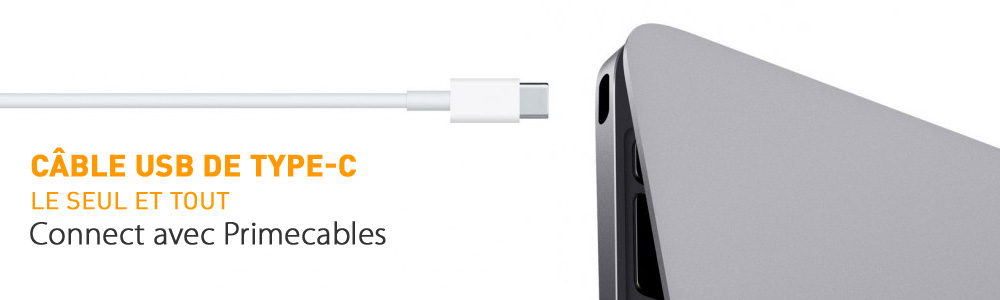
PrimeCables.ca, as Canadian online leading cable retailer, is among the earliest in the world to offer various solutions for the new USB Type-C. There will be more than 10 different cables or adapters to connect your USB Type-C with your existing devices. With PrimeCables, Canadian can go ahead to buy any new device with USB Type-C interface, without any worries. Plus, as we always do, we promise to provide you strongest cables in Canada with affordable prices.

PrimeCables's USB Type C connection solutions:
USB Type-C to HDMI Adapter (female), connects to HDTV, projector or any other HDMI display.
USB Type-C to VGA Adapter (female), connects to old TV or display.
(Please scroll down this page to check all USB Type C Cables & Adapters)
What is USB Type-C?
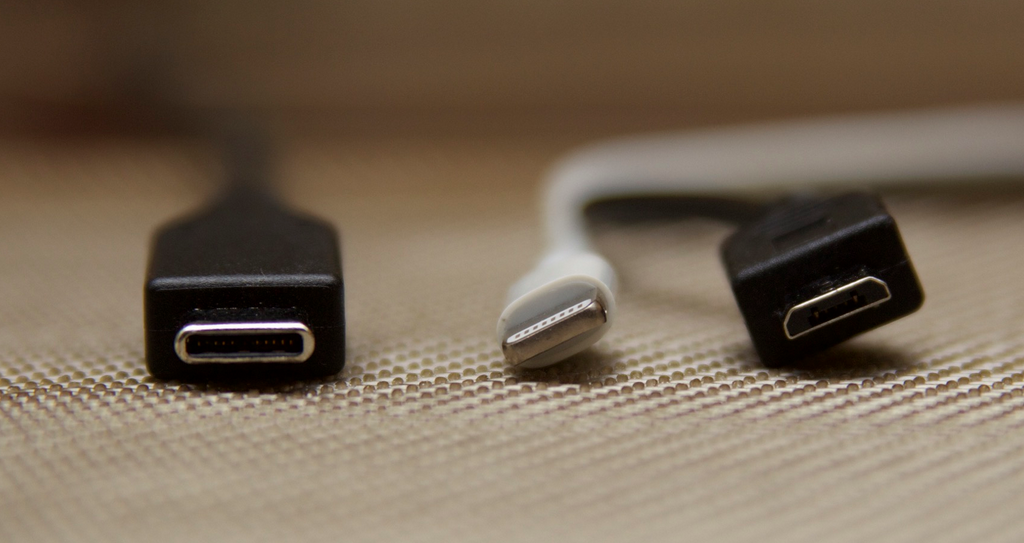
USB Type-C is the new USB-IF standard that solves several challenges faced by today's type-A and type-B cables and connectors. While this could be a problem for smartphones that keep getting thinner and thinner, it is refreshing to see one plug type that can go into any device without worrying about its type or size. USB Type-C uses a slimmer connector to allow for increasing miniaturization of consumer and industrial products. Physically, the type-C port and connector is about the same size as that of the Micro-B USB. The USB Type-C standard is gaining rapid support by enabling small form-factor easy-to-use connectors and cable with the ability to transmit multiple protocols and offer power delivery up to 100W, a significant improvement over the 7.5W for previous standards. With type-C, a USB cable's both ends will be the same, allowing for reversible plug operation.
A quick list of USB Type-C highlights:
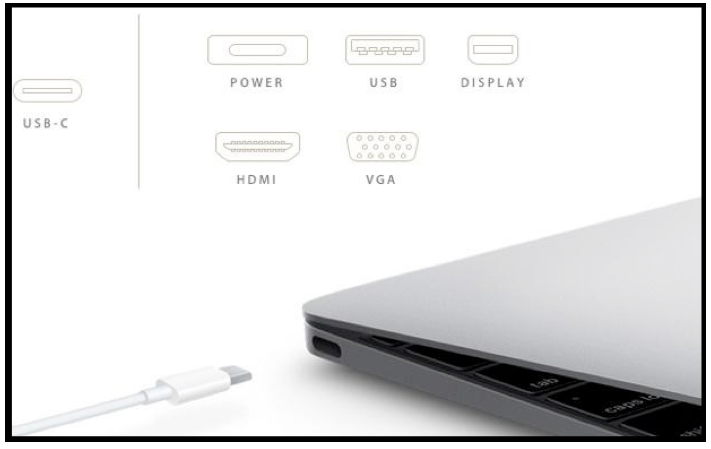
USB Type C Cable: It is kind of small reversible plug connector for USB 3.1 devices, having only one cable to route all others and with this new modification, it becomes a universal connector. This is one of the latest updates to USB 3.1 devices for example Apple has their own lightening connectors and their Macbook uses the Type C connector to plug all the peripheral devices. This connector not only connects but also provides power to the peripherals.
Superfast Charging: The outstanding specialty that will make a big sale in the market would be the faster charging. This connector is designed to deliver up to double of data of USB 3.0, 5GBps - 10GBp/s. Yes, it comes with the transfer rate of 10GBps, which means, this connector is the perfect solution for transferring full movies in just a matter of seconds.
Data and Power: It delivers up to 100 w of power which is beyond the way than USB 2.0 that delivers upto 2.5 w and USB 3.0 upto 4.5 w of power. You can conceivably power a monitor or charge a laptop through USB Type C Cable. Not only charging but also transferring the data at the same time.
Reversible Connector: The reversible feature is far more liked by most of the people. It saves you time in looking for the right side of plugging the connector into the port. Like Apple uses its lightning connector, which can be plugged in either way, in the dark too.
Backward Compatibility: Of course, it maintains the backward compatibility which is key and it really hits the bandwidth. It will be an official standard just like Type A, Type B along with micro and mini USB connectors. The USB Type C Cableis intertwined with USB 3.1, which is backward compatible with all USB standards.

Read more about USB Type C from our knowledge center:
USB Type C becoming a new industry standard
USB Type C relegates other interfaces to a niche
Stay tuned to the new USB Standard Type C
How to Compare USB Type-C to former USB types?
How to compare USB Type C to HDMI and Display Port?
Why USB Type-C is the New Industry Standard?
Adaptateur de câble USB-C à USB 3.1 M / F, compatible OTG, 15cm - blanc - PrimeCables®
USB-C mâle vers USB-A 3.1 femelle, 15cm
Câble de chargement / synchronisation USB-C vers USB 3.1A 3 Feet - blanc - PrimeCables® - 1/Paquet
Résistance de pull-up 56K ohm USB type C, prête pour une recharge rapide PrimeCables's USB Type C connection solutions: USB Type-C to HDMI Adapter (female), connects to HDTV, projector or any other HDMI display. USB Type-C to VGA Adapter (female), connects to old TV or display. (Please scroll down this page to check all USB Type C Cables & Adapters)
What is USB Type-C?
USB Type-C is the new USB-IF standard that solves several challenges faced by today's type-A and type-B cables and connectors. While this could be a problem for smartphones that keep getting thinner and thinner, it is refreshing to see one plug type that can go into any device without worrying about its type or size. USB Type-C uses a slimmer connector to allow for increasing miniaturization of consumer and industrial products. Physically, the type-C port and connector is about the same size as that of the Micro-B USB. The USB Type-C standard is gaining rapid support by enabling small form-factor easy-to-use connectors and cable with the ability to transmit multiple protocols and offer power delivery up to 100W, a significant improvement over the 7.5W for previous standards. With type-C, a USB cable's both ends will be the same, allowing for reversible plug operation.
A quick list of USB Type-C highlights:
USB Type C Cable: It is kind of small reversible plug connector for USB 3.1 devices, having only one cable to route all others and with this new modification, it becomes a universal connector. This is one of the latest updates to USB 3.1 devices for example Apple has their own lightening connectors and their Macbook uses the Type C connector to plug all the peripheral devices. This connector not only connects but also provides power to the peripherals.
Superfast Charging: The outstanding specialty that will make a big sale in the market would be the faster charging. This connector is designed to deliver up to double of data of USB 3.0, 5GBps - 10GBp/s. Yes, it comes with the transfer rate of 10GBps, which means, this connector is the perfect solution for transferring full movies in just a matter of seconds.
Data and Power: It delivers up to 100 w of power which is beyond the way than USB 2.0 that delivers upto 2.5 w and USB 3.0 upto 4.5 w of power. You can conceivably power a monitor or charge a laptop through USB Type C Cable. Not only charging but also transferring the data at the same time.
Reversible Connector: The reversible feature is far more liked by most of the people. It saves you time in looking for the right side of plugging the connector into the port. Like Apple uses its lightning connector, which can be plugged in either way, in the dark too.
Backward Compatibility: Of course, it maintains the backward compatibility which is key and it really hits the bandwidth. It will be an official standard just like Type A, Type B along with micro and mini USB connectors. The USB Type C Cableis intertwined with USB 3.1, which is backward compatible with all USB standards.
Read more about USB Type C from our knowledge center:
USB Type C becoming a new industry standard
USB Type C relegates other interfaces to a niche
Stay tuned to the new USB Standard Type C
How to Compare USB Type-C to former USB types?

A: Universal Serial Bus.
Q: Will USB-C be backwards compatible?
A: Yes, it will be backwards compatible with older USB devices. However, transfer speeds will be limited to that of the older device.
Q: What connectors will USB-C use?
A: USB 3.1 features are supported by USB-C connectors, and USB 3.1 is backwards compatible with other connectors like Micro USB, A and B.
Q: What’s the difference between Type-A and Type-C?
A: Type-A is one of the current connector types and will primarily be used as a platform for legacy devices while Type-C is the new standard moving forward. Additionally, Type-A and Type-C connectors are different shapes, so they will not work with one another.
Q: Why should I care about USB-C?
A: It’s a new all-in-one solution for power, video, and data delivery using a single cable. Instead of having a backpack full of multiple cable types, you can have one type for all uses and USB-C is the only connector currently available to support the full functions of USB 3.1.
Q: What kinds of devices will use the USB-C and USB 3.1 technology?
A: All standard expansion devices (tablets, laptops, mobile devices and accessories, A/V adapters, HDD enclosures, expansion cards, monitors, motherboards, etc.). Essentially, everything with a current Type-A and/or Type-B connector will eventually transition to Type-C.
Q: Are there devices on the market that incorporate this technology?
A: At the moment (March 2015), ASUS is working on bringing USB-C technology to its products (motherboards, expansion cards, etc). Additionally, MSI is working on bringing it to their laptop, as well as Chromebooks from Google, ASUS, MSI, and Samsung.
Q: When will this technology be fully integrated into all new products?
A: USB 2.0 took a decade to fully transition. USB 3.0 took 4 years to fully transition and is just now reaching price parity with USB 2.0. USB-C will take an estimated 3 years to become fully adopted (2017).
Q: Was Type-C created to minimize breakages?
A: No, it was created to be a universal platform that’s easy to usewith a reversible design and the ability to use just one cable type for all your devices and functions.
Q: What problems does USB-C solve?
A: The faster data transfer speeds unlock the power of the VESA DisplayPort standard, which allows for delivery of full 4K Ultra HD video, and the ability to deliver 100 watts of power allows for quicker charging of mobile devices and laptops, as well as eliminating the need for separate AC adapters, power bricks, or different cable types. Additionally, the fully reversible design means that there is no right or wrong way to plug the cable into a device. So, no matter which end you grab or which side of the connector is "up", it plugs in the first time, every time.
In short: Easier to use. Less clutter. No more power bricks
Q: How much faster is USB-C compared to previous generations of USB, to SATA, and to Thunderbolt™?
A: USB 3.1 Type-C delivers a 10Gbps data transfer rate. This makes it more than 20 times faster than USB 2.0 and twice as fast as USB 3.0. It is also faster than the 6.0Gbps rate of the SATA III standard, allowing external hard drives to exceed the current speed of internal drives! The 10Gbps speed is the same as that of Thunderbolt, but it is half the speed of the 20Gbps offered by Thunderbolt 2. However, the cost of USB-C is about a quarter of that of Thunderbolt 2, giving it a lower cost/performance ratio, making it well suited for consumer applications.
Q: What does the letter C refer to in Type-C? What Types are used by my other devices (e.g., computer, printer, phone, etc.)?
A: The C refers to the connector style. Type-A connectors are the traditional rectangular plugs that we're all familiar with. Type-B is an older device-side connector, which is often used by printers, scanners, etc. Older mobile devices use the Mini Type-B connector, while most newer devices use the Micro Type-B connector.
Q: What is daisy chaining?
A: Daisy chaining is a wiring scheme in which a chain of three or more devices are connected in series. For example, if you plug an external hard drive into your computer, then plug another external hard drive into that drive rather than directly to the computer, you have created a daisy chain.
Q: What are some key features and benefits of USB-C?
A: The ability to use a single cable for data transfers, to deliver video to a display, and power delivery are the key features of USB 3.1 Type-C. This allows it to be used to daisy chain multiple devices together, in much the same way as Intel's Thunderbolt interface is used in Apple products. However, it delivers this functionality at about a quarter of the cost of Thunderbolt, making it a much more suitable solution for consumer use.
Q: Can a reversible USB-C cable replace HDMI® and DisplayPort cables?
A:Yes. However, it will be a gradual transition and will take several years before USB-C fully replaces HDMI and DisplayPort.
Q: Will I need to purchase all new cables?
A: Not necessarily. USB 3.1 is backwards compatible with USB 2.0 and during the transition period most devices will include both Type-C and legacy Type-A connections, so you're still be able to use your current cables. Adapters are available now, which allow you to plug your legacy devices into a Type-C port, and hybrid cables with a Type-A connector on one end and Type-C on the other are also available, so as devices transition to offering only Type-C ports, you'll still be able to use your old cables.
Q: Who is USB-IF?
A: The USB Implementers' Forum is a non-profit organization that developed the Universal Serial Bus technology and maintains promotion, support, and compliance.
Q: Being a new standard, will USB-C cables be expensive?
A: Not at Primecables! Primecables is the leader in high quality, yet affordable cables.
Pays & langue
Vous êtes sur le point de passer à notre expérience de magasinage United States. Souhaitez-vous continuer?
CONNECTEZ AVEC NOUS:
Inscrivez-vous à notre newsletter par email.
Ce que disent nos clients Shopper+
Site is easy to read and navigate. Not true for many other sites. Lots of other stuff to choose from as well. When I get time, I'll have a good look. Thanks!
Sean Ljuin, 2023
Recherche simple et facile, paiement super rapide, livraisons toujours reçues dans les délais indiqués
Maurice Ljuin, 2023