Enjoy free shipping on orders over $49

Our processing time for orders may take up to 24-48 hours. Once processed, the estimated delivery time can take anywhere from 1-5 business days depending on the shipping destination.

FREE SHIPPING* on all orders over $49 in Canada !All orders under $49, the cost of shipping is only $7.95! *Free shipping is not available when the shipping address is a remote location.More >>

Enjoy free shipping on orders over $49

Our processing time for orders may take up to 24-48 hours. Once processed, the estimated delivery time can take anywhere from 1-5 business days depending on the shipping destination.

FREE SHIPPING* on all orders over $49 in Canada !All orders under $49, the cost of shipping is only $7.95! *Free shipping is not available when the shipping address is a remote location.More >>

43215

Loading...

Loading...

Loading...
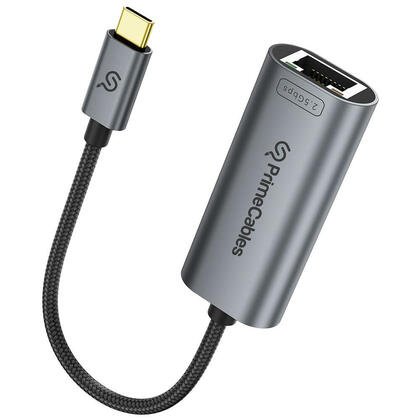
Aluminum USB-C to RJ45 2.5Gbps Network Adapter for MacBook Pro/Air, iPad Pro - PrimeCables® Reviews of Aluminum USB-C to RJ45 2.5Gbps Network Adapter for MacBook Pro/Air, iPad Pro - PrimeCables®

Reviewed by 2 customers

Sort by
Showing 1-2 of 2 reviews
    5/5

    Thanks for taking the time to learn more about our Badges! We use Badges to identify reviewers so that you can better understand their credibility.

    A Verified Buyer is an individual who has purchased the reviewed product and submitted their review through a specific process that tracks purchase history. This designation is intended to clearly identify those members of our community who are submitting reviews of products that they own.

    A Verified Reviewer is an individual who has confirmed their email address through our verification process. This designation is intended to clearly identify those members of our community who are submitting reviews using their real email addresses.

    By

    from Quebec, QC

    Thanked 0 for 6
    Jan 09, 2026

    Work as expected, but on some Linux, I had to add 2500baseT/Full to the Advertised link modes by using : ethtool -s enp47s0f3u1 advertise 0x80000000002F as it would only link up to 1gbps by default.

    Was this review helpful? Thanks (0 people thanked jean sebastien_r for this review)
    2/5

    Thanks for taking the time to learn more about our Badges! We use Badges to identify reviewers so that you can better understand their credibility.

    A Verified Buyer is an individual who has purchased the reviewed product and submitted their review through a specific process that tracks purchase history. This designation is intended to clearly identify those members of our community who are submitting reviews of products that they own.

    A Verified Reviewer is an individual who has confirmed their email address through our verification process. This designation is intended to clearly identify those members of our community who are submitting reviews using their real email addresses.

    By

    from Nepean, ON

    Thanked 4 for 20
    Aug 31, 2026

    Contrary to the description, this dongle does not work out of the box on MacOS even though it uses a generic Realtek RTL8156B chip. I’m on MacOS Tahoe and while the dongle was detected, it was not assigned an IP address by my router. After some troubleshooting and research, the problem appears to be a bug in the firmware that causes a blank MAC address to be returned tot he MacOS driver. This can be corrected by setting a MAC address manually, after which the dongle works as expected, but it’s disappointing to have to put in extra work to get it to work the way it is supposed to, especially as this has to be done after every reboot.

    Was this review helpful? Thanks (0 people thanked luis_p for this review)
Showing 1-2 of 2 reviews

Loading...